Unity Engine/Unity 2D.
[유니티 2D] 경고 메세지 출력
Muru
2023. 11. 12. 22:56
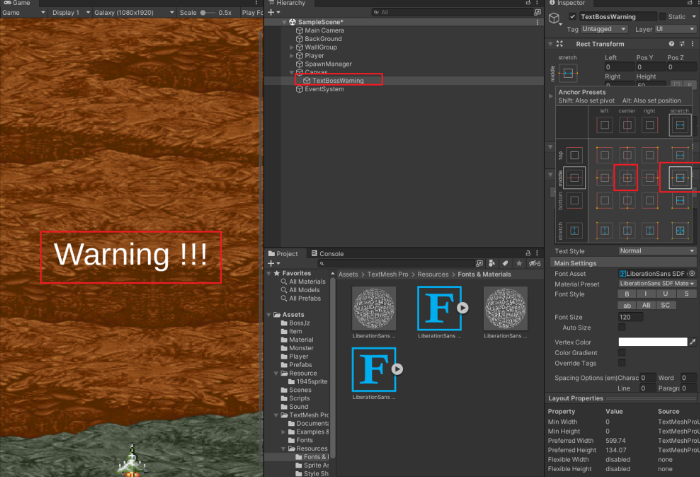
BOSS출현시 Warning Message출력을 위해 UI - TEXT-TextMeshPro
Text 폰트 위치 등 정렬
TMPColor.cs 생성하고 추가

TMPColor.cs

using TMPro;
using UnityEngine;

public class TMPColor : MonoBehaviour
{
    [SerializeField]
    float lerpTime = 0.1f;  //텍스트 깜빡깜빡
    TextMeshProUGUI textBossWarning;    //숨겨놨다가
    //객체를 비활성화 할때는 start함수 x -> Awake사용

    private void Awake()
    {
        textBossWarning = GetComponent<TextMeshProUGUI>();  //이것을 '캐싱' 이라함
    }

    private void OnEnable()
    {
        StartCoroutine("ColorLerpLoop");  //코루틴 생성
    }

    IEnumerator ColorLerpLoop()
    {
        while (true)
        {
            //색상 White -> Red Change
            yield return StartCoroutine(ColorLerp(Color.white, Color.red));
            //색상을 Red -> White
            yield return StartCoroutine(ColorLerp(Color.red, Color.white));
        }
    }

    //코루틴 함수의 색깔을 부드럽게 바꾼다.
    IEnumerator ColorLerp(Color startColor, Color endColor)
    {
        float currentTime = 0.0f;
        float percent = 0.0f;

        while (percent < 1)
        {
            //lerpTime 시간동안 while 반복문을 실행
            currentTime += Time.deltaTime;
            percent = currentTime / lerpTime;

            //Text-TextMesh의 폰트 색상을 startColor에서 endColor로 변경
            textBossWarning.color = Color.Lerp(startColor, endColor, percent);

            yield return null;
        }
    }
}


================

이제  TextBossWarning는 보이지않게 꺼주고, TMPColor.cs를 실행시키기위해 Spawn.cs로 돌아간다. 왜냐면 보스가 SpawnManager에서 생성되기때문.

[SerializeField]
    GameObject textBossWarning; //보스등장 오브젝트

    private void Awake()
    {
        textBossWarning.SetActive(false);   //보스 등장 텍스트 비활성화
    }

를 적어주고, void Stop2()가 끝날때 보스가 출현할수있도록 (true)선언을 해준다.

void Stop2()
    {
				...
        textBossWarning.SetActive(true);  //보스 등장 텍스트 활성화
    }