Unity Engine/Unity UI
[유니티] UI 자동화 #1: Binding
Muru
2023. 11. 30. 11:34

드래그 앤 드롭을 사용하지않고, 이름으로 찾아서 매핑해주자.

UI_Button (Canvas)
	-PointButton (Button)
         -PointText (BtnText)
    -ScoreText (text)
먼저 enum으로 타입을 정해준다.
enum Buttons
{
PointButton
}
enum Texts
{
PointText,
ScoreText
}public class UI_Button : MonoBehaviour
{
private void Start()
{
Bind(typeof(Buttons));
Bind(typeof(Texts));
}
private void Bind(Type type)
{
//리플렉션을 위한 Type
}
}
=================================
제너릭 <T>추가후 타입이 뭔지 알수있게함.
public class UI_Button : MonoBehaviour
{
private void Start()
{
Bind<Button>(typeof(Buttons));
Bind<Text>(typeof(Texts));
}
private void Bind<T>(Type type)
{
//리플렉션을 위한 Type
}
}
public class UI_Button : MonoBehaviour
{
    private void Start()
    {
        Bind<Button>(typeof(Buttons));
        Bind<Text>(typeof(Texts));
    }

    private void Bind<T>(Type type)
    {
    	string[] names = Enum.GetNames(type)	//enum string 변환
    }
}

===================================
버튼, 텍스트는 모두 UnityEngine.Object다.
타입이 여러개이므로 딕셔너리로 관리한다.

public class UI_Button : MonoBehaviour
{
    Dictionary<Type, UnityEngine.Object[]> _objects = new Dictionary<Type, UnityEngine.Object[]>

    private void Start()
    {
        Bind<Button>(typeof(Buttons));
        Bind<Text>(typeof(Texts));
    }

    private void Bind<T>(Type type)
    {
    	string[] names = Enum.GetNames(type)	//enum string 변환
        UnityEngine.Object[] objects = new UnityEngine.Object[names.Length];
        _objects.Add(typeof(T), objects);

        for (int i = 0; i < name.Length; i++)
        {
           //이름을 순회해서 찾아야하므로, Util.cs 생성
        }
    }
public class Util
{
public static T FindChild<T>(GameObject go, string name = null, bool recursive = false)
{
if (go == null)
return null;
if (recursive == false)
{
for (int i = 0; i < go.transform.childCount; i++)
{
Transform transform = go.transform.GetChild(i)
if (string.IsNullOrEmpty(name) || transform.name == name)
{
T component = transform.Component<T>();
if (component != null)
return component;
}
}
}
else
{
foreach (T component in go.GetComponentsInChildren<T>())
{
if (string.IsNullOrEmpty(name) || component.name == name)
return component;
}
}
return null;
}
}public class UI_Button : MonoBehaviour
{
Dictionary<Type, UnityEngine.Object[]> _objects = new Dictionary<Type, UnityEngine.Object[]>
private void Start()
{
Bind<Button>(typeof(Buttons));
Bind<Text>(typeof(Texts));
}
private void Bind<T>(Type type) wherer T : UnityEngine.Object
{
string[] names = Enum.GetNames(type) //enum string 변환
UnityEngine.Object[] objects = new UnityEngine.Object[names.Length];
_objects.Add(typeof(T), objects);
for (int i = 0; i < name.Length; i++)
{
objects[i] = Util.FindChild<T>(gameObject, names[i], true);
}
}
}
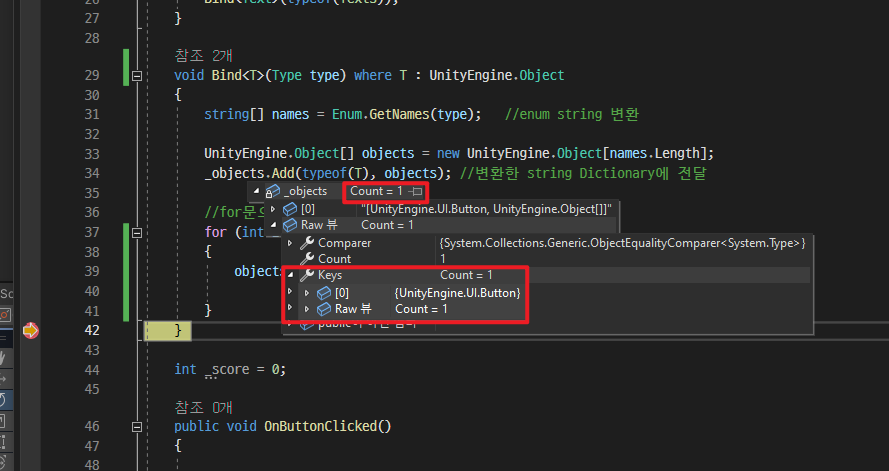
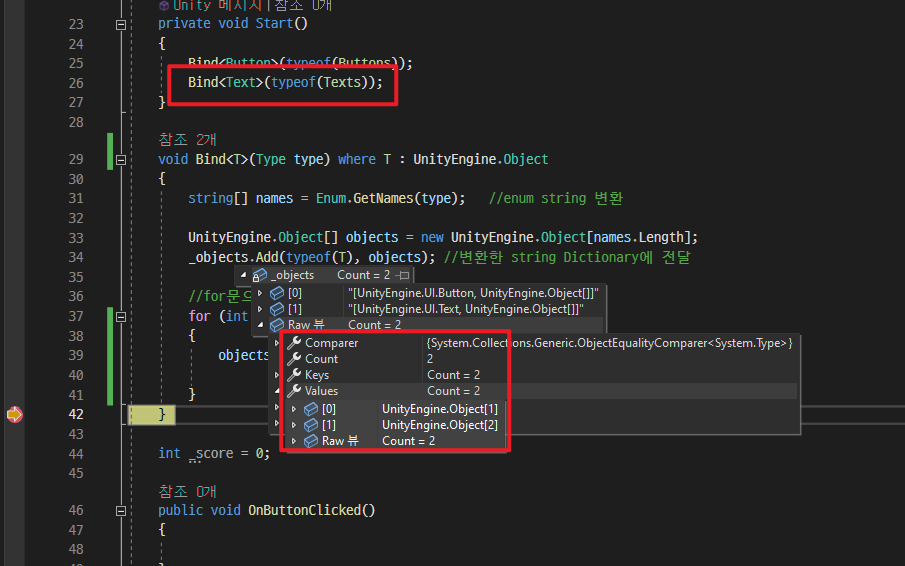
디버그를 출력시 버튼은 한개이므로 Count = 1, Type은 Button이 되고, Text는 두 개이므로 Count = 2, Type Text다.
이제 바인딩이 되었으니 Get으로 꺼내서 접근해 사용하는 부분을 #2에서 진행할것.