C++
C++ 3일차
Muru
2023. 12. 20. 11:22
#include <iostream>

namespace work1::work11::work111
{
	int a = 1;
	void doSometing()
	{
		a += 3;
	}
}

namespace work2
{
	int a = 1;
	void doSometing()
	{
		a += 5;
	}
	//void doSometing(int b)	//이름이 같아도 파라미터가 다른경우에는 다른 함수로 쳐서 충돌X
	//{
	//	a += 5;
	//}
}


int main()
{
	using namespace std;

	// :: => 영역, 범위결정 연산자 (Scope Resoloution)
	work1::work11::work111::doSometing();
	work2::a;
	work2::doSometing();

	return 0;
}
전역변수, 정적변수, 내부 연결, 외부 연결
// 전역 변수: Global Varialble
// 정적 변수: Static Varialble
// 내부 연결: Internal Linkage
// 외부 연결: External Linkage
#include <iostream>
#include "MyConstants.h"

using namespace std;

//int g_x : external linkage 초기화를 안하고 정의만 할경우
//static int g_x : internal linage 다른 파일로부터 접근할수없고 초기화할수없는 정적변수
//const int g_x(n) :

//extern int g_z;
//extern const int g_z;	//어느곳에서는 초기화를해줘야함.

//int g_y(1);
//static int g_y(1);	//다른cpp파일에서 접근 불가능한 정적변수
//const int g_y(1): 일반적인 상수 선언(같은 파일내)

//extern int g_w(1):	//초기화해준 정적변수로, 다른곳에서도 사용가능
//extern const int g_w(1)	//초기회 되었고, 외부에서 사용가능한 상수.

extern void doSomething();

int main()
{
	cout << "In main.cpp file " << Constants::pi << " Address: " << &Constants::pi << endl;

	doSomething();

	return 0;
}
#include <iostream>
#include "MyConstants.h"
extern int a = 123;
void doSomething()
{
using namespace std;
cout << "In tset.cpp file " << Constants::pi << " Address: " << &Constants::pi << endl;
}//헤더파일
#pragma once
namespace Constants
{
extern const double pi;
extern const double gravity;
//...
}namespace Constants
{
extern const double pi(3.141592);
extern const double gravity(9.81);
//...
}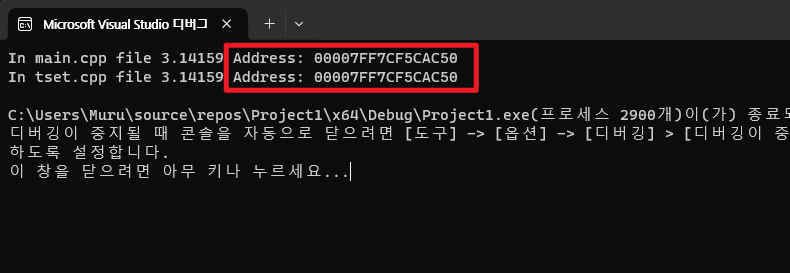
extern : 변수나 함수가 다른파일에서 정의되었음을 나타내기 위해 사용된다. (메모리 할당이 이루어짐)
'extern'의 주된 목적은 다중파일 프로젝트에서 전역 변수나 함수의 선언과 정의를 분리하는것이다.

선언(Declaration) 변수가 존재한다는 것을 컴파일러에게 알립니다.(메모리할당 발생x)

정의(Definition) 변수에 대한 메모리를 할당, 초기값 설정

코드 모듈화 및 재사용성 증진
Auto
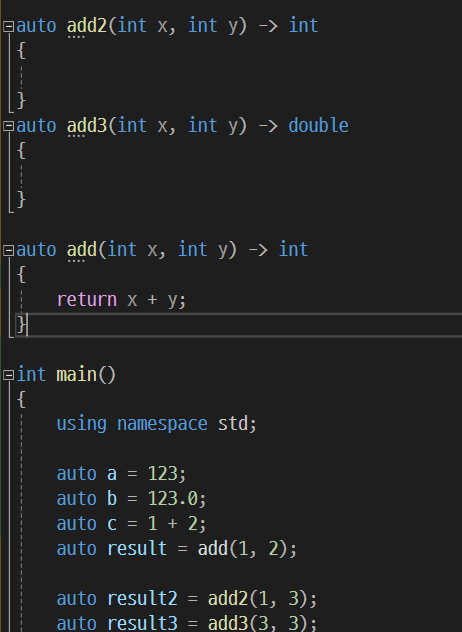
더보기
줄바꿈하기 편한 -> int, double 선언
형변환 Type Conversion
#include <iostream>
#include <typeinfo>
#include <iomanip>

int main()
{
	using namespace std;

	//numeric promotion: 넓은곳으로 이동

	//unsigned로 계산한건 unsigned로 내보내려함.
	//우선순위 문제로 결과를 -5 int로 출력안해줌.
	cout << 5u - 10 << endl;

	// 우선순위 순위
	// int << unsigned int << unsigned long << long long << unsigned long long << float << double << ong duble

	//double 4.0이 암시적 형변환이되어 int가 된다 라는 뜻
	int i = 4.0;

	//좀더 깔끔하게 적어주기
	int n = int(4.0);					//c++스타일
	int t = (int)4.0;					//c 스타일
	int e = static_cast<int>(4.0)		//최근 스타일

	//numeric conversion: 큰것을 작은것으로 이동, 타입이 바뀌는것
	//double d = 3;

	return 0;
}
String
#include <iostream>
#include <string>
#include <limits>

int main()
{
	using namespace std;

	cout << "Your age: ";
	int age;
	cin >> age;

	//최대 32767내의 글자까진 괜찮다
	//std::cin.ignore(32767, '\n');
	std::cin.ignore(std::numeric_limits<std::streamsize>::max(), '\n');


	cout << "Your name: ";
	string name;
	//cin >> name;
	std::getline(std::cin, name);

	cout << name << " " << age << endl;


	return 0;
}
#include <iostream>
#include <string>
int main()
{
using namespace std;
string a("Hello, ");
string b("World");
string hw = a + b; //문자열과 문자열을 더하는 append / Rinux
hw += " I`m good";
string c("Hello, World");
cout << hw << endl;
cout << c.length() << endl;
return 0;
}
//c.length() 출력값이 12인 이유는 문자열 끝에 숨어있는 값이 있기 때문.
//Hello, World는 char 13이다.자료형에 가명 붙이기
#include <iostream>
#include <vector>
#include <cstdint>

int main()
{
	using namespace std;

	//float, double값을 바꿔도 문제없음.
	typedef float distance_t;

	double	   my_distance;
	distance_t home2work;
	distance_t home2school;

	typedef vector<pair<string, int>> pairlist_t;
	using pairlist_p = vector<pair<string, int>>;

	pairlist_t pairlist1;
	pairlist_p pairlist2;

	return 0;
}
Struct 구조체
#include <iostream>
#include <string>
using namespace std;

//구조체 struct
struct Person
{
	double height;
	float  weight;
	int		  age;
	string   name;

	void print()
	{
		cout << height << " " << weight << " " << age << " " << name;
		cout << endl;
	}
};

//구조체 안에 구조체 정의 가능
struct Family
{
	Person me, mom, dad;
};

//함수 리턴가능
Person getMe()
{
	Person me{ 2.0, 100.0, 25, "Yes" };

	return me;
}

int main()
{
	Person me_from_func = getMe();
	me_from_func.print();

	return 0;
}
Switch case
#include <iostream>

using namespace std;

enum class Colors
{
	BLACK,
	WHITE,
	RED,
	GREEN,
	BLUE
};

void printColorName(Colors color)
{

	//switch (color)
	//{
	//case Colors::BLACK:
	//	cout << "Black" << endl;
	//	break;
	//case Colors::WHITE:
	//	cout << "Whitre" << endl;
	//	break;
	//}
	switch (static_cast<int>(color))
	{
	case 0:
		cout << "Black" << endl;
		break;
	case 1:
		cout << "White" << endl;
		break;
	}
}

int main()
{
	//printColorName(Colors::BLACK);

	int x;
	cin >> x;
	{
		switch (x)
		{
			case 0:
				cout << "Zero";
				break;
			case 1:
				cout << "One";
				break;
			case 2:
				cout << "Two";
				break;
		}

		cout << endl;
	}

	return 0;
}
랜덤함수 출력
#include <iostream>
#include <cstdlib>	//std::radn(), std::srand()
#include <ctime>
#include <random>

using namespace std;

int main()
{
	std::random_device rd;
	std::mt19937 mersenne(rd());	//랜덤함수 생성 알고리즘: create a mesenne twister,
	std::uniform_int_distribution<> dice(1, 6);

	for (int count = 1; count <= 20; count++)
	{
		cout << dice(mersenne) << endl;
	}

	return 0;
}
프로그래머의 의도대로 사용하지않는 사용자들을 위한 std::잘쓰기
#include <iostream>

using namespace std;
//std::cin 잘써보기!

int getInt()
{
	cout << "Enter an integer number: ";
	int x;
	cin >> x;
	while(true)
	{
		if (std::cin.fail()) {
			std::cin.clear();
			std::cin.ignore(32767, '\n');
			cout << "Invalid number, plz try again" << endl;
		}
		else {
			std::cin.ignore(32767, '\n');
			return x;
		}
	}
}

int getOperator()
{
	while (true) {

		cout << "Enter an Operator (+, -) : ";	//TODO: more Operators *, / etc.
		char op;
		cin >> op;
		std::cin.ignore(32767, '\n');

		if (op == '+' || op == '-') {
			return op;
		}
		else
			cout << "제대로 입력하세요." << endl;
	}
}

void printResult(int x, char op, int y)
{
	if (op == '+')
		cout << x + y << endl;
	else if (op == '-')
		cout << x - y << endl;
	else
	{
		cout << "Invalid operator" << endl;
	}
}

int main()
{
	int  x  = getInt();
	char op = getOperator();
	int  y  = getInt();

	printResult(x, op, y);

	return 0;
}